
Inventory
Set up inventory types and fields, search what you have in stock, and read a feed and map it so your listings sync on their own.
Inventory Mailer does a lot: inventory and fields, contacts and groups, templates, campaigns, automations, and the results of every send. Connect the AI assistant you already use, like Claude, ChatGPT, or Copilot, and it can work across nearly all of it. Ask in plain words, and it does the setup, the clicking, and the busywork.
Your AI gets the same tools as the assistant built into Inventory Mailer, across the whole product. A job that takes an afternoon of clicking becomes one request.
Set up inventory types and fields, search what you have in stock, and read a feed and map it so your listings sync on their own.
Add and update contacts one at a time or in bulk, build groups from a filter, and keep your lists tidy.
Compose a whole template or rewrite part of one, add live inventory grids with the filter you describe, and pull in images from your library or the web.
Draft a campaign, pick who gets it, down to a pipeline stage, and schedule it or send it.
Create a recurring send, turn it on, pause it, or resume it.
Read opens, clicks, bounces, and which items drew the clicks, then plan the next send from the answer.
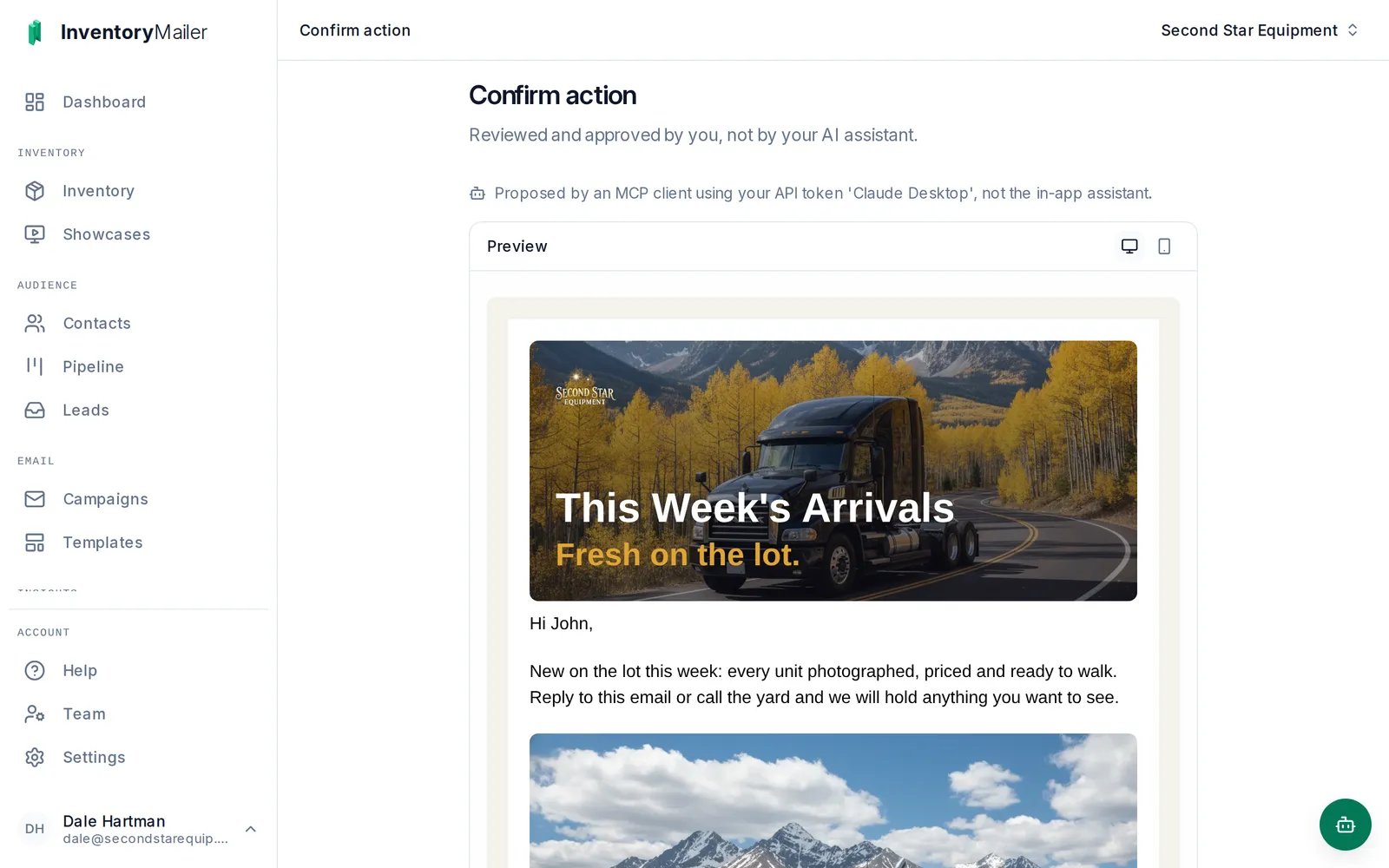
You: Rewrite the intro on our Weekly Arrivals email. Warmer, and tell people we will hold anything they call about. Opened the Weekly Arrivals template Rewrote the intro text block Assistant: Here is the new intro: "New on the lot this week: every unit photographed, priced and ready to walk. Reply to this email or call the yard and we will hold anything you want to see." I sent it to Inventory Mailer as a change for you to approve. Nothing is saved until you do. Review and approve in Inventory Mailer
The connection acts as you, in one account, with the same access you have in the app. A sales rep's assistant works in that rep's book. Connect read-only if you only want answers.
Each change it makes from outside the app arrives as an approval page in Inventory Mailer showing exactly what will happen. An email edit shows up as the finished email.
Only a signed-in person can approve. Sending, scheduling, or turning on an automated campaign also asks for a one-time code we email to you.
And this is the page the link opens, with the finished email.
It takes about a minute. In Claude or ChatGPT, add Inventory Mailer as a connector, sign in, and pick your account. That is the whole setup. Copilot and other assistants that support MCP connect the same way, and the steps for each are in the app, under Help.
On a company plan of your AI assistant, an admin may need to allow custom connectors first.
Keep inventory and contacts in step with your dealer system or website using scoped tokens. API changes apply straight away, because your own code is making them, and the API does not send email.
Your assistant, your agreement. The model answering is the one you connect. What it reads from your account goes to that AI provider, under your agreement with them.
On every plan, inside the app. Every plan has the assistant built into Inventory Mailer. Connecting your own, and the API, come with Pro and Business, and with the 30-day free Pro trial.
The 30-day free trial runs on Pro, so you can connect your assistant on day one and approve its first change yourself.